Easy row and stitch counting
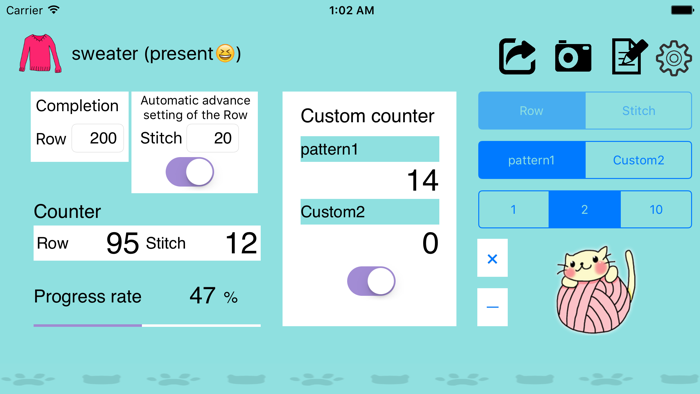
Count with the “Row” and “Stitch” buttons. Choose to count by 1, 2 or 10.

KNITTING COUNTER
A simple knitting counter that counts rows and stitches and saves them for each project.
SCREENSHOTS
FEATURES
Count with the “Row” and “Stitch” buttons. Choose to count by 1, 2 or 10.
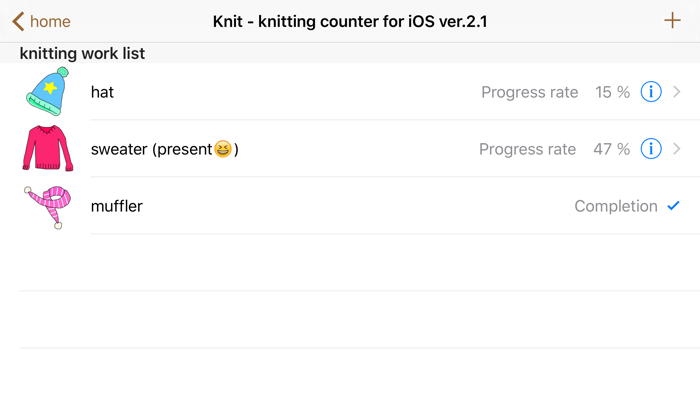
Counts are saved automatically for each work, and the work list shows progress and completion.
Set the total number of rows to see your progress. Rows can also advance automatically at a set stitch count. Two custom counters are included.
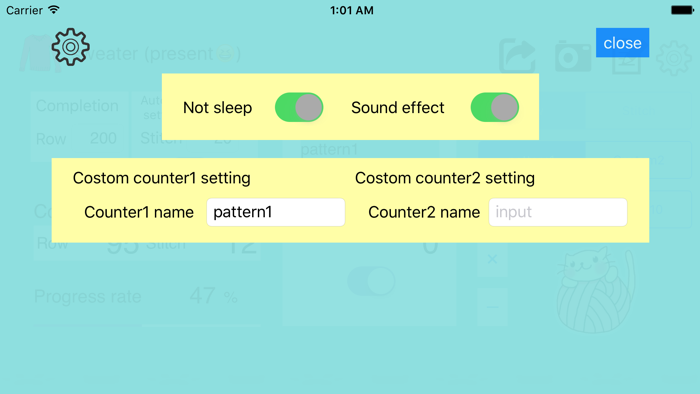
Attach images and notes. You can also keep the screen from sleeping and turn sound effects on or off.
HOW TO USE
The basic flow.
Tap “+” in the work list, then choose a name and an image and save.
Open the work and tap the “Row” and “Stitch” buttons to count.
Set the total number of rows to see your progress, also shown in the work list.
FAQ
Knit is an older version for iOS 8.4 or later. On the latest iOS, please use the renewed Knit2.
Knit2 is a renewed version of Knit that supports the screen sizes of the latest devices and the latest iOS. It works just the way you’re used to.
In the image viewer, an image may look like it has disappeared after being attached (iPhone only). Pinching in or out with two fingers makes it appear normally. Other counter features are not affected.
Yes, ads are shown. We use Google AdMob to serve ads. For how information related to ads is handled, please see the Privacy Policy.
Please use the contact form and choose “Knit” as the app.
UPDATE HISTORY